How IPTV Streaming Delivers Live TV Over Broadband
Modern high-speed iptv streaming transforms television by routing digital broadcasts directly through your home broadband connection rather than traditional satellite dishes or coaxial aerials. Consequently, you receive superior picture stability, lower monthly costs, and rapid on-demand access on every screen in your home.
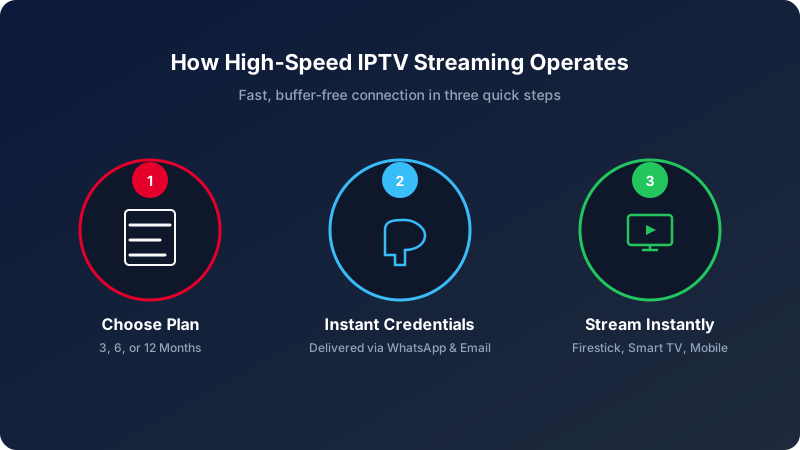
Three Easy Steps to Launch Your IPTV Streaming
Getting started with iIPTV is designed to be completely straightforward. Because we eliminate unnecessary hardware shipments, you can start enjoying your favourite channels within minutes of placing an order.
Choose Your Plan
Select a flexible subscription package tailored to your entertainment requirements.
First, review our transparent pricing tiers. We offer 3 months for £29.99, 6 months for £39.99, or 12 months for £59.99. Once you select your ideal duration, message us on WhatsApp to start setup.
Receive Instant Credentials
Our team generates your secure Xtream Codes and M3U playlist credentials within minutes.
Next, our automated provisioning system issues your private login details directly via WhatsApp. Furthermore, we include customised installation instructions tailored specifically to your chosen playback hardware.
Install & Enjoy 4K TV
Download a leading IPTV application, sign in, and start watching immediately.
Finally, launch your preferred media player on your TV, Firestick, or phone. After pasting your credentials, your full channel lineup and 7-day electronic programme guide synchronise automatically.
What You Need for Smooth IPTV Streaming
Reliable video streaming depends upon two fundamental components: a stable broadband connection and a compatible playback device. Fortunately, modern UK broadband packages comfortably exceed the necessary specifications.
To prevent stuttering during high-demand Premier League matches, we suggest connecting your streaming box via an Ethernet network cable whenever practical. In addition, you can easily verify your domestic download speed using an independent broadband speed checker.
Download Speed Guidelines
SD & HD streams require 10 Mbps. Meanwhile, 4K Ultra HD broadcasts at 50fps perform best with 25+ Mbps of steady bandwidth. Test your connection on Speedtest by Ookla.
Compatible Hardware
Works flawlessly on Amazon Firestick 4K, Samsung or LG Smart TVs, Apple TV, Android TV boxes, iPhones, iPads, and Windows computers.
Wi-Fi Optimisation
If wireless connection is unavoidable, ensure your device connects to the 5 GHz Wi-Fi band rather than 2.4 GHz to minimise packet delay.
Recommended Applications for IPTV Streaming
You do not need proprietary proprietary boxes. Instead, you can choose from numerous top-rated, open-ecosystem media players designed for fluid navigation and rich TV guides.
Widely praised for its polished interface resembling standard UK set-top boxes, seamless EPG loading, and rapid channel navigation.
An exceptionally versatile client featuring multi-screen layout, master search, and native Xtream Codes login compatibility.
A modern, user-friendly player that integrates built-in media players with comprehensive video on demand playback.
The premier choice for direct Smart TV installation without requiring external HDMI dongles or complicated sideloading.
A dependable multi-platform solution offering robust playlist caching and versatile AirPlay streaming capabilities.
Common Questions Regarding IPTV Streaming
Find straightforward answers to frequently asked technical and setup inquiries.
Can I watch on multiple devices simultaneously?
Each subscription is dedicated to one active screen at a time. This guarantees that your account receives full unthrottled server bandwidth with zero buffering. You can configure your credentials on multiple devices, but stream on one at a time.
Do I need to use a VPN with iIPTV?
In most instances, a VPN is unnecessary because our secure UK streaming servers operate with encrypted protocols. Nonetheless, our streams remain fully compatible with reputable VPN providers like ExpressVPN, NordVPN, and Surfshark if you prefer added privacy.
What happens if a stream pauses or buffers?
Our platform features automated fallback servers. If a local route experiences congestion, the stream automatically switches to an alternate CDN node. In addition, restarting your home broadband router or toggling player hardware acceleration frequently solves local caching issues.
Where can I read detailed step-by-step installation walkthroughs?
We provide comprehensive tutorials covering every device. Check out our dedicated Amazon Firestick setup guide and our Smart TV installation guide for full walkthroughs.
Upgrade Your Television Experience in 5 Minutes
Enjoy over 18,000 live channels and 20,000 films in 4K resolution. Our friendly UK support team is standing by to guide your configuration.